myTrustmark® can do more for you with Card Controls


Always be in control of your Trustmark personal debit and credit cards to be certain they are used the way you want, when you want


Card controls FAQs Card controls FAQs

Key features


  • Available within myTrustmark
  • Freeze/unfreeze cards
  • Set spending limits
  • Apply controls based on location, transaction type or merchant type
  • View spending analytics
key features of card controls key features of card controls

Tools to manage your cards with confidence

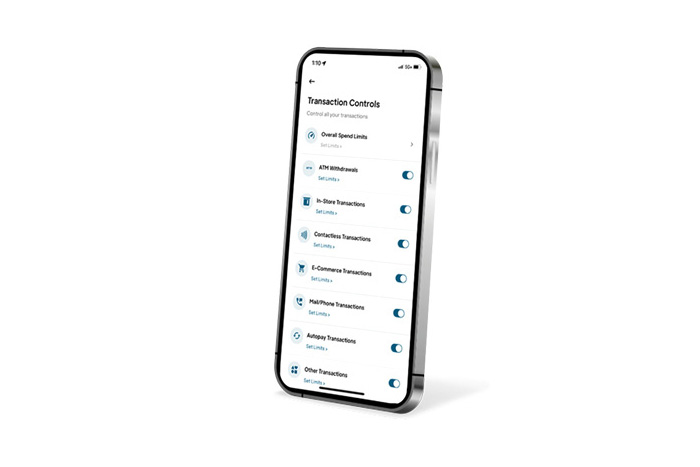
transaction controls


Transaction Controls

Set spending limits and enable/disable transactions by type

location controls


Location Controls

Limit transactions geographically

merchant controls


Merchant Controls

Allow payments to pre-selected merchants

FAQs

Personal debit cards are automatically enrolled. Personal credit cards will need to be manually enrolled.

Click on the icon in the top right corner of the Card Controls screen, and then click Add a new card.

Note: You must enter your name exactly as it appears on your credit card.

Location Controls require access to your location to work effectively and allow cardholders to limit transactions geographically.

Within Card Controls on the mobile app, click on the icon in the top right corner, then click Notifications Settings to view and update notification options. Card Controls notifications are only available as push notifications, which must be enabled in the myTrustmark app. Within the myTrustmark app, navigate to Menu > Settings > Push Notifications and toggle the switch to Enable Notifications.

Convenient benefits


Enjoy the ease and convenience Card Controls gives you to change your card PIN whenever needed, as well as add your card to digital wallets


Learn more about card controls Learn more about card controls

Access Card Controls within myTrustmark online banking. Log in and from the Menu, click Services, then Card Controls.


Not a myTrustmark user? Download the app today to get started.